Showing posts with label generic handler. Show all posts

Saturday, April 19, 2014

Access Session Variable in ASHX Files ASP.NET

Many of us has found an obstacle to access the session variables in our generic handler. Here i found the right way to access the session variables in our handler file (.ashx).

For that you need to import an extra namespace,

using System.Web.SessionState;

Then inherit the class with an extra interface named  IReadOnlySessionState.
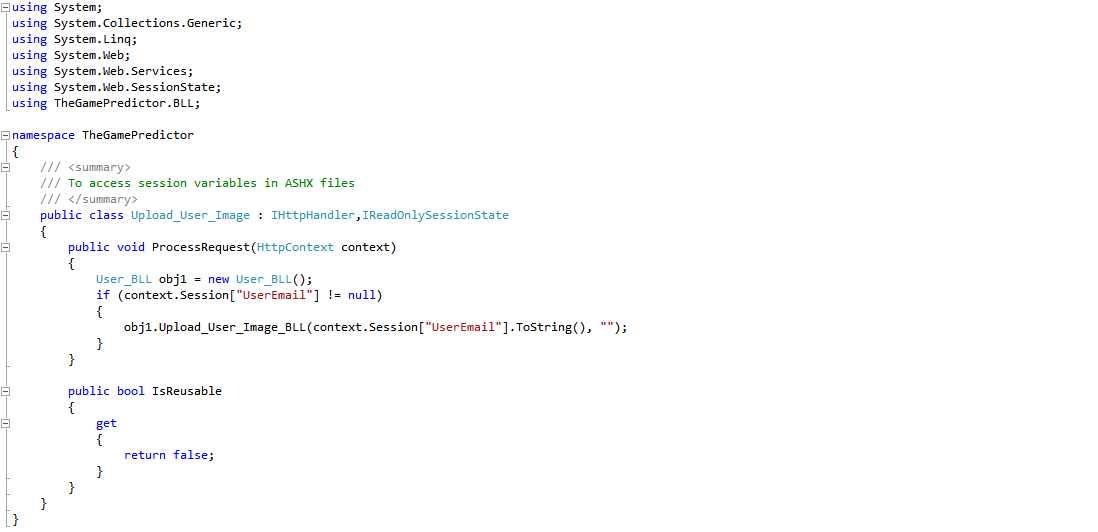

Now using the context variable you can access the session variable. So simple and so easy.

Reference : hanselman.com

Multiple File Uploading Asynchronously using Jquery and Generic Handler in ASP.NET C#

To days topic is File Upload Asynchronously using Jquery and Generic Handler in ASP.NET C#. In this article I will show you how to upload a single file or multiple files in your ASP.NET project using jquery and generic handler. 

So, what actually Generic Handler is?

Some ASP.NET files are dynamically generated. They are generated with C# code or disk resources. These files do not require web forms. Instead, an ASHX generic handler is ideal. It can dynamically return an image from a query string, write XML, or any other data.
 For further information you can follow this link. Click  here.

Lets come directly to the code.

For this project you need a normal  asp file uploader. So add a file uploader into your project. And also add a folder named "Uploader" in which the files will be dumped. 

then add a generic handler into your project and named it Uploader.ashx


After this add a script tag and write these code into that tag.

Now open the Uploader.ashx file and write the following code.
Now add some additional files like css, js, swf and run the code. Enjoying your uploading.

Download the  full source code here.

Popular Posts

Pageviews